The core module. A class can hold any number of grade tables — “tabs” — whose columns you build as a tree of categories and grade columns. What you enter is weighted, calculated, evaluated and can be exported.
Building a table — four routes
Smart grade table — the assistant asks in two steps how many terms you need and which top-level and sub-categories, including weighting and a preview before anything is created.
Ready-made template — terms with sections such as “written” and “oral”.
Simple grade list — grade columns only, no sections.
Empty table — build everything yourself.
Weighting per calculation column in percent, with a Distribute evenly button. Calculation is either psychometric (weighted average) or by mode (most frequent value; in the event of a tie the app asks).
Grading scales
Four built-in scales: 1–6, 1–6 (±) with real thirds of a grade (1+ = 0.67 … 6 = 6.0), upper secondary 0–15 and E / TE / NE (achieved, partly achieved, not achieved).
Your own scales from ten templates: USA (A+–F), France (0–20), Switzerland (1–6), Austria (1–5), UK (GCSE 9–1), Sweden (A–F), Netherlands (1–10), Spain (0–10), IB (1–7), percentage scale (0–100).
The scale applies per tab and can be changed later — with a guided value mapping, so existing grades keep their meaning.
Points instead of grades
Switchable per grade column: you enter total points and the app calculates the grade.
You set the grading key per test — percentage thresholds, a pass mark, or a piecewise-linear scale — with a preview before you apply it.
The key is frozen per test: if you change the scale later, the test you already marked keeps the assessment you gave it.
More points than the maximum count as a bonus. You can override an individual grade manually at any time and bring the automatic one back with Calculate from points.
Getting your class in
Import a CSV file — the app detects the separator itself and understands common column headers.
Import a PDF — text recognition reads the list (up to 20 pages).
Scan a list — photograph it with the camera.
Add individually, or take over a student list from another class.
If the app already knows a name, it asks: create a new student or use the existing one — also as a bulk action.
Grades themselves can be imported from CSV too: a dedicated assistant with mapping, a conflict strategy and a preview before anything is written.
Evaluating
Tab statistics with cards for development, sections compared, students and anomalies (“falling behind their own average”, “persistently below the pass mark”, “showing the strongest improvement”).
Anonymise names for presentation — and export everything as a PDF.
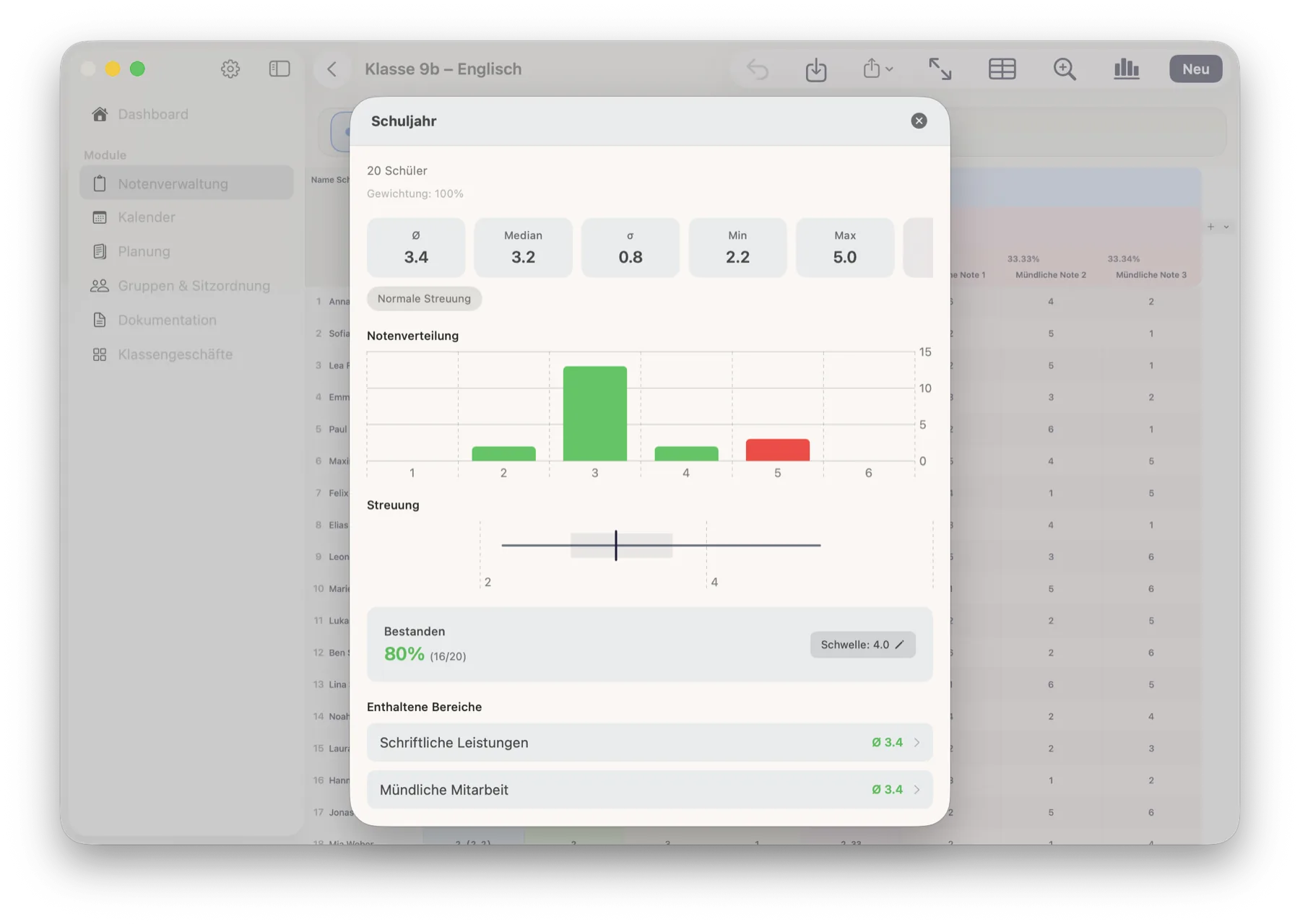
Column statistics: average, median, standard deviation, minimum, maximum, mode, quartiles, outliers, grade distribution and pass rate.
The app derives the pass mark from the scale — you can override it and reset it at any time.
Charts: box plot, grade distribution, class trend, section comparison and a student heat map.
Exporting
Excel (.xlsx) — the current tab or all of them, one worksheet per tab.
PDF — print-ready, the current tab or all of them.
The statistics separately as a PDF.
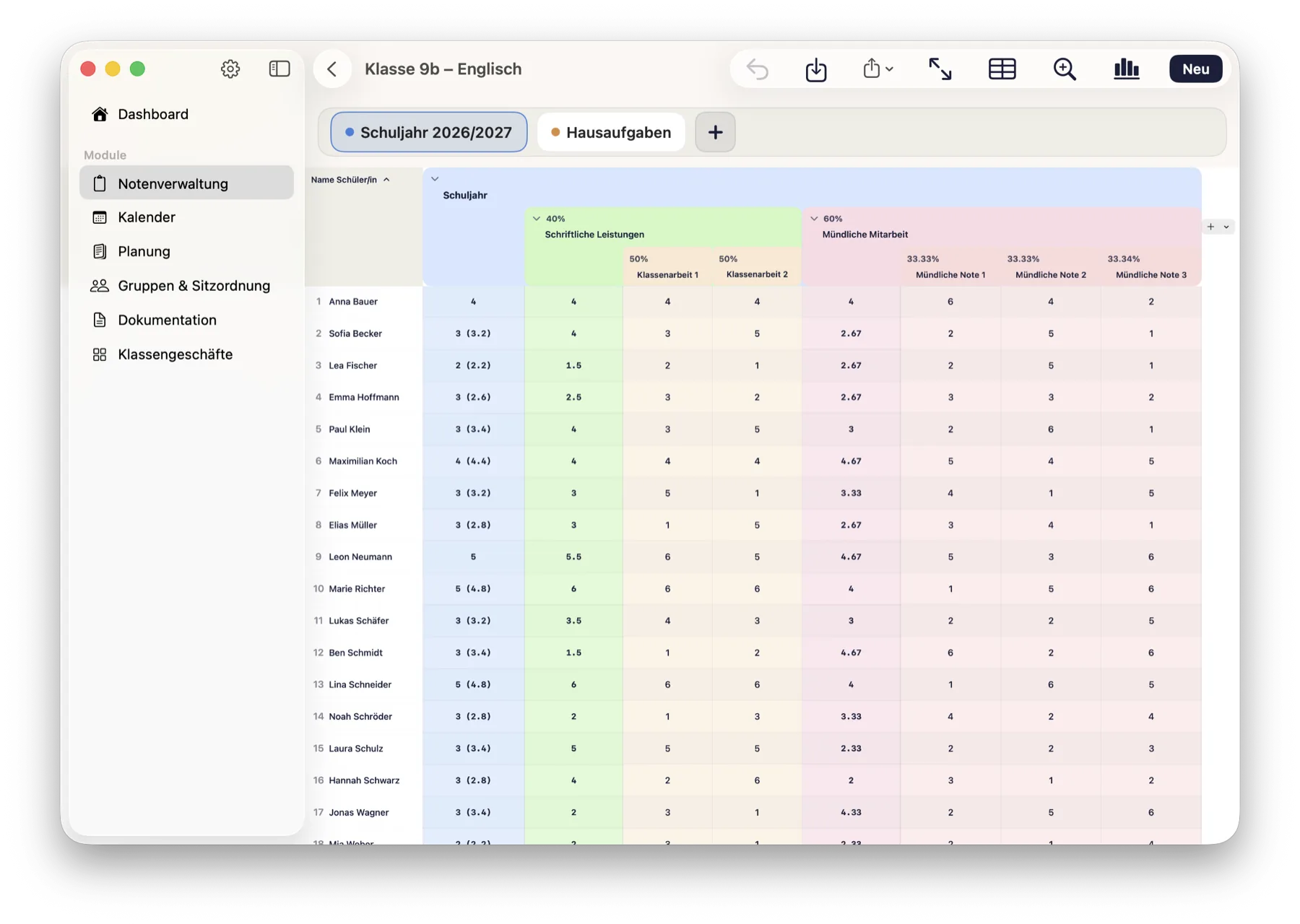
The grade tree: written 40 %, oral 60 %, with the individual assessments below. Every level can be collapsed.One tap on a calculation column: average, median, spread, grade distribution and pass rate — including the sections it is made of.
How it connects
This is where classes and students come into being — the entities every other module builds on. Groups & seating reads the grades of a tab to form attainment-balanced groups and seating plans. Documentation shows a child's grade history right inside their record.
What it deliberately does not do
No attendance register. You can attach “absent” or “excused” as a note to a grade cell — that is an aide-mémoire, not an evaluable absence. The official register belongs in the school administration system.
The four built-in scales are immutable so that existing grades keep their meaning. If you need something else, create your own scale.
A value outside the selected scale is stored and displayed, but not included in the calculation — the app says so.
Scan a list exists on iPad and iPhone only; the Mac has no system camera sheet for it.
 ClassTiles